In this assignment I was tasked with implementing a simple maze game using OpenGL and SDL. The player explores the environment looking for keys which will open doors until the goal is found.
The map that the player explores is defined by a grid of characters. Walkable areas are represented by 0s, walls by Ws, keys by lowercase letters, and doors by uppercase letters.
5 5
0000G
WW0W0
0WAW0
0W0WW
S000a
Initially, I attempted to write the assignment using the example code from HW4, however I got sick of writing C++ real fast. I simply do not enjoy writing C++, so I ported the code to a language I enjoy - Zig.
To start I needed to find zig libraries to call OpenGL, SDL, and GLM. I could have directly imported the c headers but why do that when existing, more Zig friendly, bindings exist.
Luckily, the SDL project also provides a port of the project that uses the Zig build system. This made it super easy to import sdl functions I need.
Now for OpenGL, zigglgen provides a very nice wrapper around the OpenGL library.
zigglgen generates declarations for OpenGL functions, constants, types and extensions using the original names as defined in the various OpenGL specifications (as opposed to the prefixed names used in C).
| C | Zig | |
|---|---|---|
| Command | glClearColor | ClearColor |
| Constant | GL_TRIANGLES | TRIANGLES |
| Type | GLfloat | float |
| Extension | GL_ARB_clip_control | ARB_clip_control |
And for the math library, I used zlm which aims to be a Zig implementation of the GLM library.
To start, I reimplemented the scene parser.
The scene parser populates an array list with the map of the maze. It also marks important positions like location of the player and of the goal.
pub var player_pos: Vec3 = undefined;
pub var goal_pos: Vec2 = undefined;
pub var map_width: usize = 0;
pub var map_height: usize = 0;
pub var game_map: std.ArrayList([]u8) = undefined;
pub var keys_collected: std.AutoHashMap(u8, void) = undefined;
After parsing the scene we need to initialize SDL.
try errify(c.SDL_Init(c.SDL_INIT_VIDEO));
try errify(c.SDL_GL_SetAttribute(c.SDL_GL_CONTEXT_MAJOR_VERSION, 3));
try errify(c.SDL_GL_SetAttribute(c.SDL_GL_CONTEXT_MINOR_VERSION, 2));
try errify(c.SDL_GL_SetAttribute(c.SDL_GL_CONTEXT_PROFILE_MASK, c.SDL_GL_CONTEXT_PROFILE_CORE));
window = try errify(c.SDL_CreateWindow(window_title, window_w, window_h, c.SDL_WINDOW_OPENGL));
gl_context = try errify(c.SDL_GL_CreateContext(window));
We store our models as arrays of a Vertex struct.
pub const Vertex = extern struct {
    pos: [3]float,
    normal: [3]float,
    uv: [2]float,
};
The vertex shader takes in a poistion, normal, and uv coord, then positions it in the 3D world using the model, view and proj matrices.
// Vertex Shader
in vec3 position;
in vec3 inNormal;
in vec2 inTexCoord;
out vec3 fragPos;
out vec3 normal;
out vec2 texCoord;
out vec3 vertColor;
uniform mat4 model;
uniform mat4 view;
uniform mat4 proj;
uniform vec3 objectColor;
void main() {
    fragPos = vec3(model * vec4(position, 1.0));
    normal = mat3(transpose(inverse(model))) * inNormal;
    texCoord = inTexCoord;
    vertColor = objectColor;
    gl_Position = proj * view * model * vec4(position, 1.0);
 }
The output variables get passed to the fragment shader which implements a blinn-phong style lighting model. Optionally, if we want the pattern to be a checkerboard we can set the useCheckerboard uniform to 1.0;
// Fragment Shader
in vec3 fragPos;
in vec3 normal;
in vec2 texCoord;
in vec3 vertColor;
out vec4 outColor;
uniform vec3 lightPos;
uniform vec3 viewPos;
uniform float ambient;
uniform float useCheckerboard;
void main() {
    vec3 color = vertColor;
    // Checkerboard pattern for floor
    if (useCheckerboard > 0.5) {
        float scale = 2.0;
        int cx = int(floor(texCoord.x * scale));
        int cy = int(floor(texCoord.y * scale));
        if ((cx + cy) % 2 == 0) color *= 0.7;
    }
    // Ambient
    vec3 ambientLight = ambient * color;
    // Diffuse
    vec3 norm = normalize(normal);
    vec3 lightDir = normalize(lightPos - fragPos);
    float diff = max(dot(norm, lightDir), 0.0);
    vec3 diffuse = diff * color;
    // Specular
    vec3 viewDir = normalize(viewPos - fragPos);
    vec3 reflectDir = reflect(-lightDir, norm);
    float spec = pow(max(dot(viewDir, reflectDir), 0.0), 32.0);
    vec3 specular = 0.3 * spec * vec3(1.0);
    outColor = vec4(ambientLight + diffuse + specular, 1.0);
}
To render the scene we need to populate the GPU memory with models of the walls, keys and floor.
I used a simple cube for the walls, a plane for the floor, and a custom key model for the keys. Setting up these buffers requires us to initialize the vao and vbo for each model. We bind the vao and vbo and then use VertexAttribPointer to describe how to pass the Vertex strutct to the Vertex shader.
fn setupVertexBuffer(
    vao: *c_uint,
    vbo: *c_uint,
    buffer: []const Vertex,
) void {
    assert(vao.* == 0);
    assert(vbo.* == 0);
    assert(buffer.len > 0);
    gl.GenVertexArrays(1, @ptrCast(vao));
    gl.GenBuffers(1, @ptrCast(vbo));
    gl.BindVertexArray(vao.*);
    gl.BindBuffer(gl.ARRAY_BUFFER, vbo.*);
    gl.BufferData(gl.ARRAY_BUFFER, @intCast(buffer.len * @sizeOf(Vertex)), buffer.ptr, gl.STATIC_DRAW);

    gl.VertexAttribPointer(0, 3, gl.FLOAT, gl.FALSE, @sizeOf(Vertex), @offsetOf(Vertex, "pos"));
    gl.VertexAttribPointer(1, 3, gl.FLOAT, gl.FALSE, @sizeOf(Vertex), @offsetOf(Vertex, "normal"));
    gl.VertexAttribPointer(2, 2, gl.FLOAT, gl.FALSE, @sizeOf(Vertex), @offsetOf(Vertex, "uv"));

    gl.EnableVertexAttribArray(0);
    gl.EnableVertexAttribArray(1);
    gl.EnableVertexAttribArray(2);
}
Now we need to draw the models.
The floor is simple, loop over the map and draw a floor tile for each location. Before we draw we set the useCheckerboard uniform to 1.0 to acheive a tiled floor effect. The translation matrix is simply the x and z position of tile in the map.
// draw floor
{
    gl.BindVertexArray(floor_VAO);
    defer gl.BindVertexArray(0);

    gl.Uniform1f(gl.GetUniformLocation(program, "useCheckerboard"), 1.0);
    defer gl.Uniform1f(gl.GetUniformLocation(program, "useCheckerboard"), 0.0);

    gl.Uniform3f(gl.GetUniformLocation(program, "objectColor"), 0.4, 0.35, 0.3);
    for (0..maze.map_width) |x| {
        for (0..maze.map_height) |z| {
            const translation = zlm.Mat4.createTranslationXYZ(@floatFromInt(x), 0, @floatFromInt(z));
            gl.UniformMatrix4fv(gl.GetUniformLocation(program, "model"), 1, gl.FALSE, @ptrCast(&translation.fields[0][0]));
            gl.DrawArrays(gl.TRIANGLES, 0, models.floor_vertices.len);
        }
    }
}
The wall is very simialr but we draw cubes instead. If the wall is a door we change the color.
// draw walls
gl.BindVertexArray(wall_VAO);
for (0..maze.map_width) |x| {
    for (0..maze.map_height) |z| {
        const char = maze.game_map.items[z][x];

        var color: zlm.Vec3 = undefined;
        var draw = false;
        if (char == 'W') {
            color = zlm.vec3(0.6, 0.6, 0.65);
            draw = true;
        } else if (char >= 'A' and char <= 'E') {
            color = maze.getDoorColor(char);
            draw = true;
        } else if (char == 'G') {
            color = zlm.vec3(1.0, 0.84, 0.0);
            draw = true;
        }
        if (draw) {
            const translation = zlm.Mat4.createTranslationXYZ(
              @as(float, @floatFromInt(x)) + 0.5,
                0,
                @as(float, @floatFromInt(z)) + 0.5,
            );
            gl.UniformMatrix4fv(gl.GetUniformLocation(program, "model"), 1, gl.FALSE, @ptrCast(&translation.fields[0][0]));

            gl.Uniform3f(gl.GetUniformLocation(program, "objectColor"), color.x, color.y, color.z);
            gl.DrawArrays(gl.TRIANGLES, 0, models.cube_vertices.len);
        }
    }
}
The keys are a bit more involved. We offset the height by a ‘bob’ factor that is determined by the current SDL tick. Additionally, we apply rotation also dependent on the current tick.
// Draw floating keys
gl.BindVertexArray(key_VAO);

for (0..maze.map_width) |x| {
    for (0..maze.map_height) |z| {
        const char = maze.game_map.items[z][x];

        if (char >= 'a' and char <= 'e') {
            const color = maze.getKeyColor(char);
            const bob = @sin(@as(float, @floatFromInt(c.SDL_GetTicks())) / 300.0) * 0.1;
            const translation = zlm.Mat4.createTranslationXYZ(
                @as(float, @floatFromInt(x)) + 0.5,
                bob + 0.3,
                @as(float, @floatFromInt(z)) + 0.5,
            );
            const rotate = zlm.Mat4.createAngleAxis(
                .{ .x = 0, .y = 1, .z = 0 },
                @as(float, @floatFromInt(c.SDL_GetTicks())) / 500.0,
            );
            const scale = zlm.Mat4.createScale(0.5, 0.5, 0.5);

            const model = scale.mul(rotate).mul(translation);

            gl.UniformMatrix4fv(gl.GetUniformLocation(program, "model"), 1, gl.FALSE, @ptrCast(&model.fields[0][0]));
            gl.Uniform3f(gl.GetUniformLocation(program, "objectColor"), color.x, color.y, color.z);
            gl.DrawArrays(gl.TRIANGLES, 0, key_vertices.len);
        }
    }
}
And finally we draw the window: try errify(c.SDL_GL_SwapWindow(window));
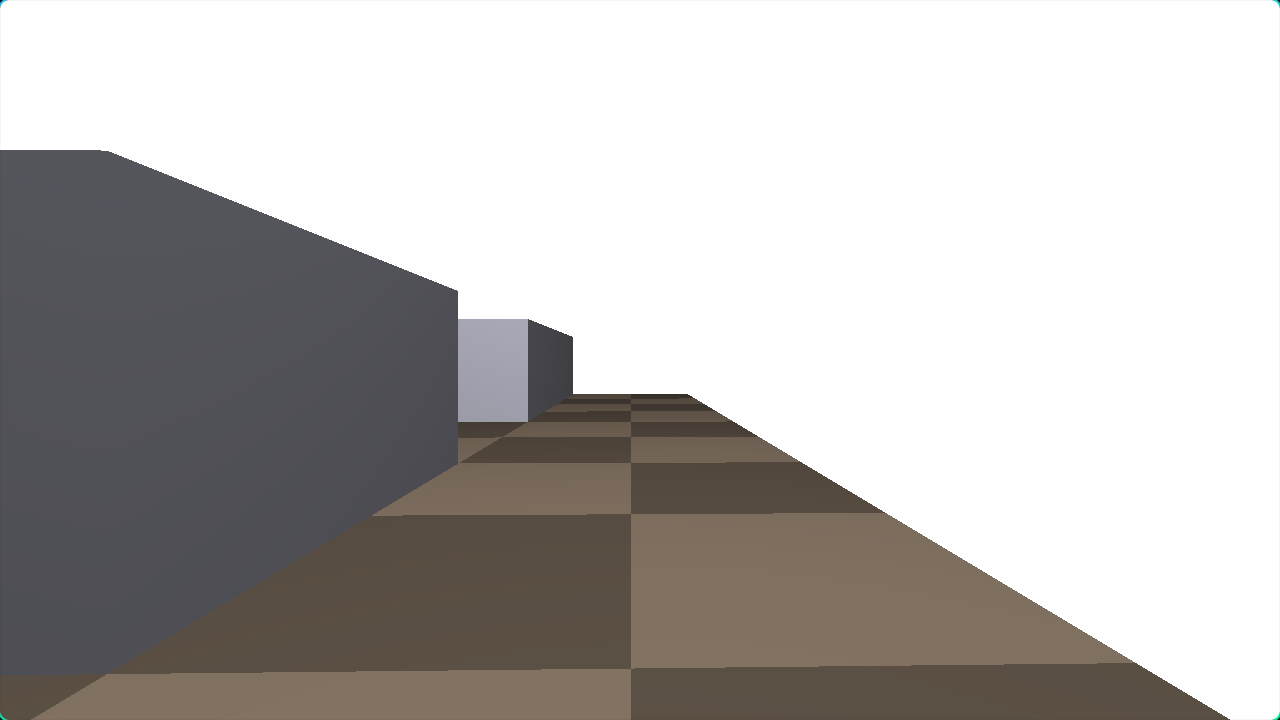
To move the player we simply check if the player is holding any of the WASD keys. If they are, we add/subtract the corresponding direction to create a movement vector.
const front = Vec3.new(@cos(player.yaw), 0, @sin(player.yaw));
const right = Vec3.new(-front.z, 0, front.x);
var move = Vec3.zero;
if (keys[c.SDL_SCANCODE_W] == true)
    move = move.add(front);
if (keys[c.SDL_SCANCODE_S] == true)
    move = move.sub(front);
if (keys[c.SDL_SCANCODE_A] == true)
    move = move.sub(right);
if (keys[c.SDL_SCANCODE_D] == true)
    move = move.add(right);
Then if the move vector is non-zero. We check if the player’s new position collides with any walls or doors and only allow movemen’t if it does not.
const new_pos = player.pos.add(move);

if (canMoveTo(new_pos.x + player.radius, new_pos.z) and
    canMoveTo(new_pos.x - player.radius, new_pos.z) and
    canMoveTo(new_pos.x, new_pos.z + player.radius) and
    canMoveTo(new_pos.x, new_pos.z - player.radius))
{
    player.pos = new_pos;
}
Finally, we check if the player collides with any keys, if they do add the key to the players held keys.
The result is a maze with where the player can search and collect keys.
The above video uses a custom scene with the map:
15 15
S000a0000E0000G
WWAWWW0WW0WWWWW
0000W000W0c0W0W
0WW0WWWWWWW0W0W
0W00W000W000W0W
0W0WW0W0W0W0W0W
0W0000W000W000W
0WWWW0W0W0WWW0W
bW00W0W0WWW0W0W
0W0WW0W000W0W0W
WW0WW0W0W0W0W0W
000000W0WCW000W
0W0WWWWWW0WWWWW
0W00Bd0W000D00e
WWWWWWWWWWWWWWW
Code
The code requires zig version 0.15.1 or greater and can be compiled with zig build. It has only been tested on Arch Linux, other OS’s should work but have not been tested.
Then the executable can be run with ./zig-out/bin/proj4 level3.txt